


Of all the engagement metrics Instagram tracks, saves are the one most creators overlook and the one the algorithm quietly weighs the heaviest when deciding what to recommend to new audiences. This guide explains exactly why saves matter so much, what kind of content earns them, and how to give your save-worthy posts the early push they need to clear the algorithm's distribution threshold.
Why Saves Carry So Much Weight
A like takes a fraction of a second and means relatively little in isolation. A save means someone found your content valuable enough to actively want to come back to it later: a recipe, a checklist, a tutorial, a specific piece of advice worth revisiting. Instagram treats that intent as one of the clearest possible signals of genuinely useful content, and rewards it with meaningfully extra distribution compared to posts that only earn likes.
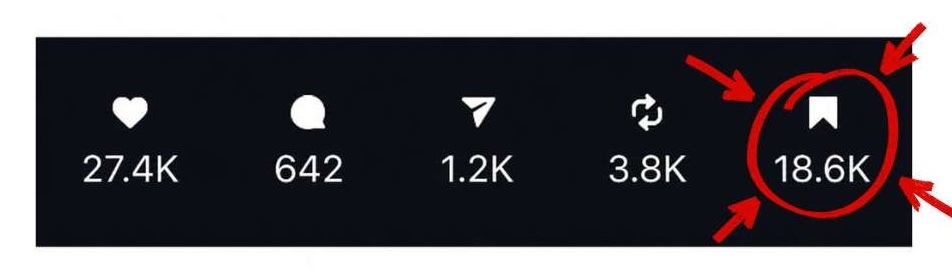
Saves vs. Likes vs. Shares: What Each One Tells the Algorithm
Likes reflect quick, low-effort approval. Shares reflect content someone wants other people specifically to see, which signals social value. Saves reflect content someone wants for themselves later, which signals personal, lasting value. Each metric tells the algorithm something genuinely different, but saves are consistently the strongest indicator of long-term, repeatable value, which is exactly what keeps an account relevant well beyond any single viral moment.
Content Formats That Reliably Get Saved
Reference-style content earns the most saves by a clear margin: step-by-step guides, before-and-after comparisons, checklists, and carousels packed with information people genuinely want to revisit. If a post answers a question someone might need again later it's a strong candidate for earning the save button rather than just a passing like.
Designing Posts Specifically for Save Behavior
Carousels with a clear, numbered structure consistently outperform single images for save rate, since they naturally feel like a reference document rather than a single passing moment. Dense, well-organized information broken into digestible slides or sections gives viewers a concrete reason to save rather than just scroll past after a quick glance.
Make Save-Worthy Content Easy to Spot
Tell people directly: a simple “save this for later” prompt in your caption or as on-screen text works because it removes any ambiguity about whether a post is genuinely meant to be revisited. This simple, direct prompt alone can meaningfully increase save rates on educational or list-based content, since many viewers genuinely intend to save something but need the explicit reminder to actually do it.
Using Saves to Inform Future Content
Review your save counts alongside likes and comments each month, and pay close attention to which specific topics or formats consistently earn the highest save rates relative to their reach. This pattern often reveals exactly what your audience finds most genuinely useful — information that's easy to miss if you're only tracking likes and follower growth.
How the Explore Page Uses Save Data
Instagram's Explore page algorithm draws heavily on save-to-reach ratio when deciding which posts to surface to people who don't yet follow an account, often weighting it more heavily than raw like count for this specific purpose. A post with a modest number of likes but an unusually high save rate relative to its reach can outperform a post with far more likes but a lower save rate, simply because the save signal more strongly predicts that new viewers will also find the content valuable enough to engage with deeply.
Save Rate as a Content-Quality Benchmark
Rather than tracking save count in isolation, calculate save rate as a percentage of reach for each post, and use that percentage as your real benchmark for content quality over time. A post reaching a small audience with a high save percentage often represents genuinely stronger content than a post reaching a much larger audience with a proportionally low save percentage, even though the raw save count might suggest otherwise at a glance.
Repurposing High-Save Content
Once you identify a post or carousel with an unusually strong save rate, don't let it disappear into your grid history. Repurpose it into a Reel, reference it again in a future caption, or expand it into a more detailed follow-up post. Content that already proved itself valuable enough to save is content your audience has explicitly told you they want more of, that signal is too valuable to use only once.
Like other engagement signals, saves matter most in the first hours after posting, while Instagram is still actively deciding how widely to distribute a piece of content beyond your existing followers. To help strong, genuinely save-worthy posts clear that early threshold faster, many creators buy Instagram saves on their highest-value content, giving genuinely useful posts the early momentum they deserve rather than letting them wait for organic saves to slowly accumulate.
Mistakes That Suppress Save Rates
A Simple Example Scenario
A recipe account might post a visually appealing single photo of a finished dish alongside a nearly identical multi-slide carousel breaking down the same recipe step by step with measurements included. The single photo tends to earn plenty of likes since it's visually appealing, but the carousel consistently earns a meaningfully higher save rate, because it functions as something the viewer genuinely wants to reference again later while actually cooking not just admire once while scrolling.
Saves as a Long-Term Content Audit Tool
Once or twice a year, sort your entire post history by save count rather than likes or reach, and study what the top results have in common. This exercise often reveals a content theme or format you've been underinvesting in relative to how much your audience genuinely values it, providing a clear, data-backed direction for the months ahead rather than relying on gut instinct alone. Treat this audit as seriously as you would a financial review, it's just as capable of reshaping your strategy for the better.
Once you've identified which content formats reliably earn the highest save rates, build them intentionally into your regular content calendar rather than treating them as occasional exceptions. A recurring “save this guide” carousel or checklist post, published on a predictable schedule, trains your audience to expect and look forward to your most genuinely useful content which compounds into stronger save rates and better algorithmic distribution over time.
- Creating content that's entertaining in the moment but offers nothing worth revisiting later.
- Never explicitly prompting viewers to save the post.
- Using a cluttered carousel design that makes the information hard to actually reference later.
- Ignoring save-rate data in favor of only tracking likes and follower growth.
- Posting reference-style content without a clear, scannable structure.
Key Takeaways
💡 Saves are one of the strongest signals for Explore page distribution, often outweighing raw like count.
💡 Reference-style content (guides, checklists, comparisons) consistently earns the highest save rates.
💡 Explicitly prompting viewers to “save this for later” meaningfully increases save rates on eligible content.
💡 Track save rate as a percentage of reach, not just the raw count, for a more accurate quality benchmark.
💡 A save boost on genuinely useful posts can help them clear the algorithm's early distribution threshold faster.
Frequently Asked Questions
Do saves really matter more than likes for reach?
In many of Instagram's ranking contexts, yes. Saves signal genuine, lasting value, which the algorithm treats as a stronger indicator of content quality than a quick like.
What's the easiest way to increase saves?
Create genuinely reference-style content (guides, checklists, comparisons) and explicitly prompt viewers to save it for later use.
Is buying saves a normal growth tactic?
Yes, particularly for genuinely useful posts that deserve more reach but haven't yet accumulated enough organic saves to clear the algorithm's early distribution threshold.
How can I see my save counts?
Save counts are available in Instagram Insights for professional accounts, listed alongside likes, comments, and shares for each individual post.
Does the Explore page weight saves more than likes?
Often, yes, save-to-reach ratio is a strong signal in Explore page ranking, sometimes outweighing raw like count when Instagram decides which posts to show to non-followers.
Should I repurpose posts that get a lot of saves?
Absolutely. A high save rate is a direct signal that your audience found the content valuable, making it a strong candidate to expand into a Reel, a follow-up post, or a future reference in your captions.
Do saves matter for Reels as well as static posts and carousels?
Yes, a Reel that earns strong saves alongside strong watch time tends to receive some of the widest distribution of any content type, since it's signaling both immediate engagement and lasting value at once, a combination that's genuinely rare and highly rewarded by the algorithm.
Saves remain one of the most underrated metrics on the platform precisely because they're invisible in the public-facing post — no one sees your save count but you. That makes them easy to overlook, but genuinely powerful once you start designing content specifically to earn them, and worth reinforcing with a boost on the posts that deserve wider reach, particularly early on while your organic save volume is still building.
If you found this article helpful, you might also enjoy these related posts. They cover similar topics, answer common questions, and offer additional ideas to help you get the most out of your journey.