

If you've noticed carousel posts popping up more often on your Instagram feed, that's not an accident. Instagram's algorithm has quietly favored carousels for a while now, and the reason comes down to one thing: they keep people on the app longer and they get saved more than almost any other content format. If you're trying to grow your account in 2026, understanding how to use carousels to increase saves isn't optional anymore. It's one of the most reliable levers you have.
In this guide, we'll break down exactly why carousels drive saves, how to structure them so people actually want to bookmark your content, and the specific design and copywriting choices that separate a carousel that gets ignored from one that gets saved, shared, and revisited.
Why Carousels Are Built for Saves
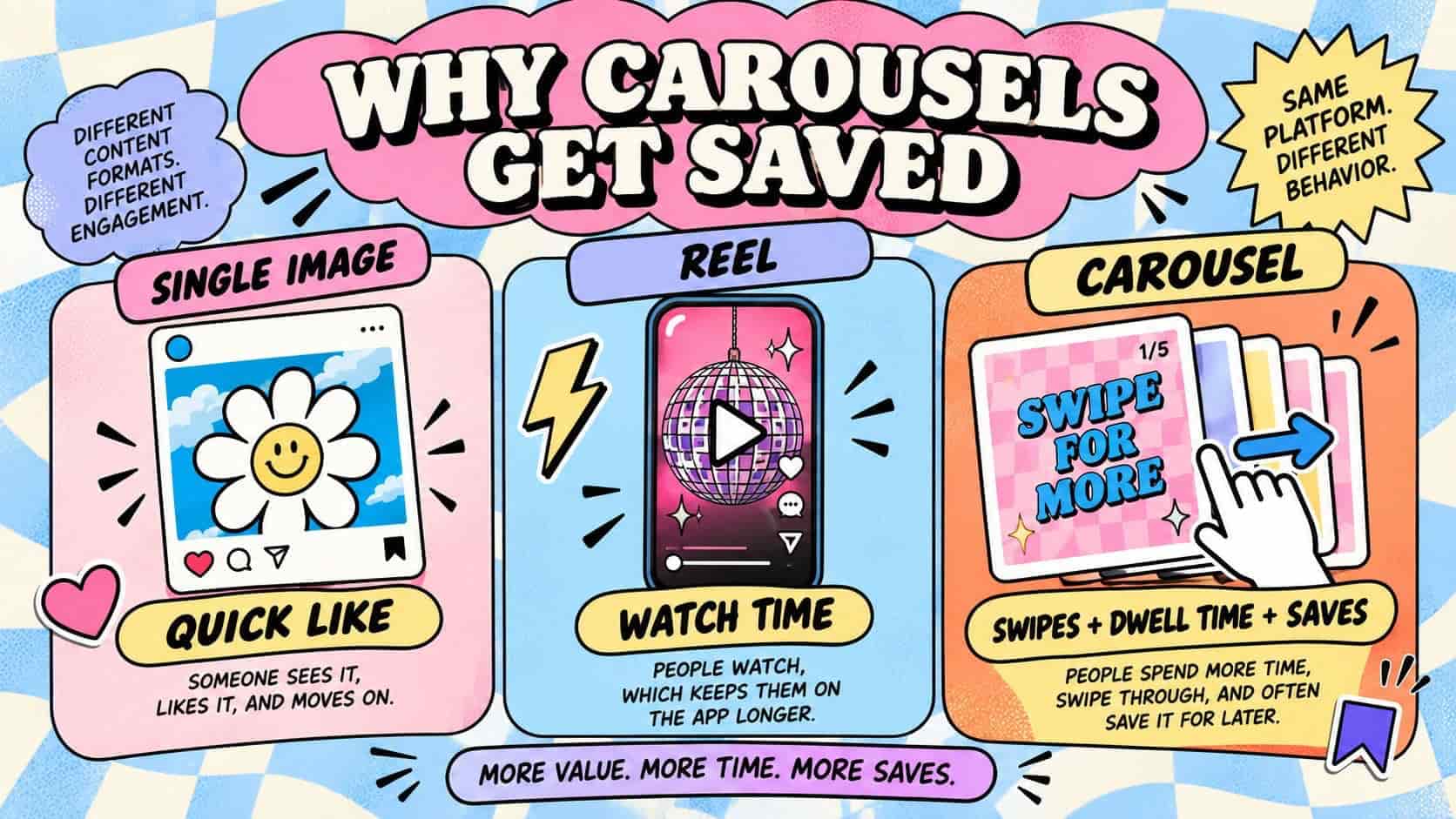
Every content format on Instagram rewards a different kind of engagement. Reels reward watch time. Single images reward quick likes. Carousels reward something different: dwell time and intentional interaction.
When someone swipes through a carousel, Instagram tracks how long they spend on each slide and whether they make it to the end. That data tells the algorithm the content is worth showing to more people. But saves take it a step further. A save is a strong signal that says "I want to come back to this later," and Instagram treats that as one of the clearest indicators of content quality it has.
Carousels are naturally suited to earning saves because they're built around structure. A single photo can be liked in half a second. A carousel, by design, asks for more attention. It presents information in steps, which is exactly the kind of content people bookmark for later: recipes, checklists, tutorials, before-and-afters, and frameworks. You're not just posting a photo anymore, you're building a small piece of reference material.
The Psychology Behind Why People Save Carousels
To use carousels effectively, it helps to understand what actually triggers a save. People don't save content because it's pretty. They save content because it's useful to their future self.
Think about the last carousel you saved. It was probably one of the following:
- A step-by-step guide you wanted to follow later
- A list of tips you didn't have time to absorb in the moment
- A comparison or breakdown you wanted to reference again
- Something aspirational you wanted to revisit for motivation
- A resource that felt too dense to fully process in one scroll
Notice the pattern. Every one of those examples involves a delay between seeing the content and using it. That gap is where the save button lives. If your carousel doesn't create that gap, people will like it and move on. If it does, they'll tap save without thinking twice.
Slide One Is Doing More Work Than You Think
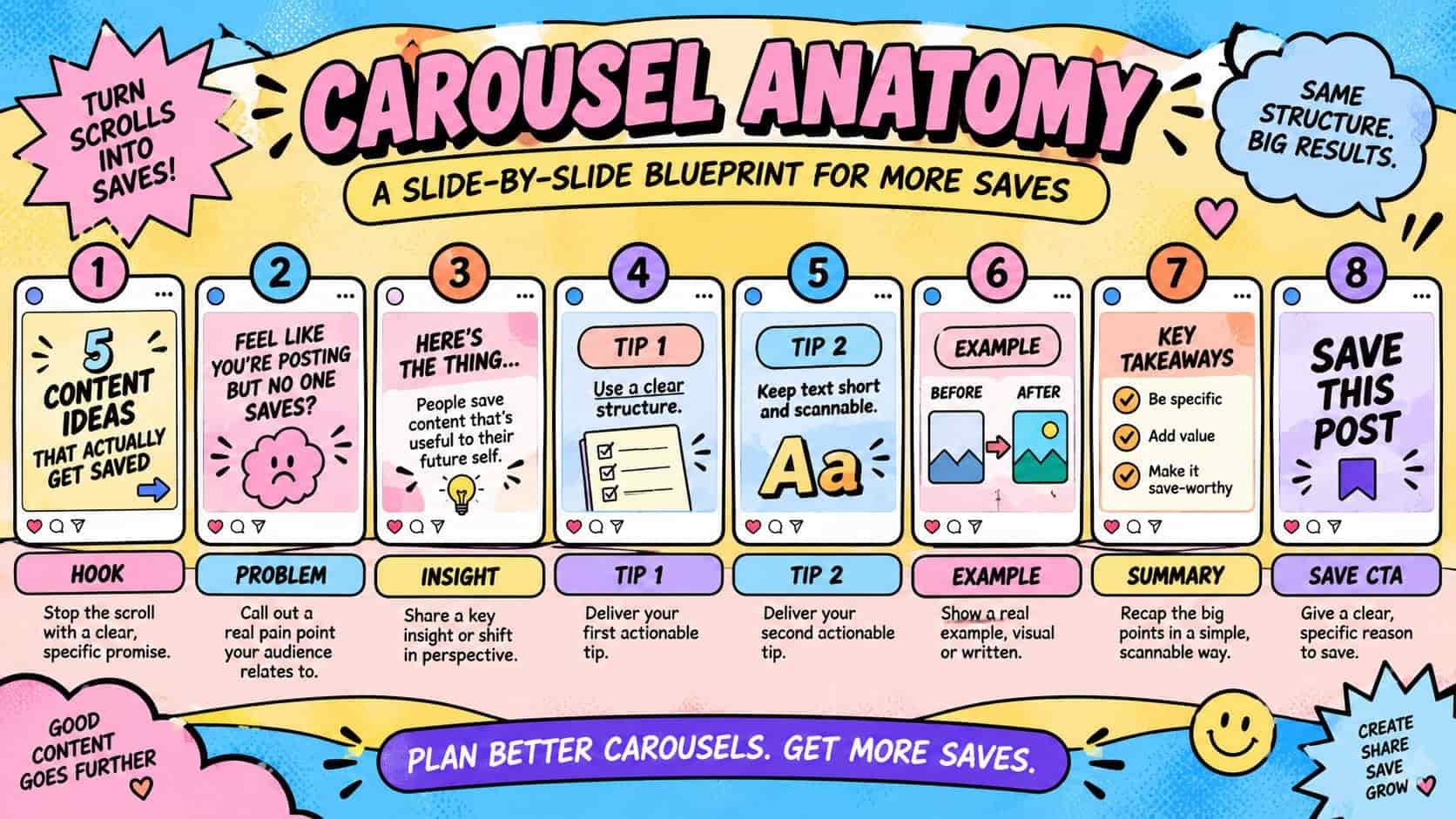
The biggest mistake creators make with carousels is treating every slide equally. In reality, your first slide has one job: stop the scroll and set the expectation that this post is worth swiping through. If slide one fails, nothing after it matters, because most people won't get there.
A strong opening slide usually does one of the following:
- States a clear, specific promise ("5 editing mistakes killing your reach")
- Poses a question your audience is already asking themselves
- Uses a bold, high-contrast statement that creates curiosity
- Signals value immediately, so the viewer knows exactly what they're getting
Avoid vague openers. "Some tips for you" doesn't tell anyone why they should keep swiping. "3 things I wish I knew before hitting 10k followers" does. Specificity is what makes people commit to the swipe, and the swipe is what makes the save possible.
Structuring the Middle Slides for Maximum Save Value
Once someone starts swiping, your job is to keep the value building slide by slide without giving them everything on slide two. This is where a lot of carousels fall apart. Creators either front-load all the good information and lose momentum, or they pad the middle with filler that makes people drop off before reaching the end.
A few structural approaches that consistently perform well:
The numbered list format. Each slide covers one point in a list (like "Tip 3 of 7"). This format works because it gives the viewer a visible sense of progress, which keeps them swiping to see what's next.
The problem-to-solution arc. Early slides establish a pain point, middle slides build tension or explain why the common approach fails, and later slides deliver the actual fix. This mirrors how people naturally process information and makes the payoff feel earned.
The before-and-after breakdown. Especially strong for niches like fitness, home design, or business growth, where visual or numeric proof matters. People save these to track their own comparable progress later.
Whatever structure you choose, keep text per slide short. A carousel isn't a blog post crammed into squares, it's a skimmable sequence. If a slide takes more than a few seconds to read, you're asking for a drop-off instead of a save.
Design Choices That Actually Impact Save Rates
Design isn't just about looking clean, it directly affects whether someone finishes your carousel and whether they feel it's worth bookmarking. A few practical guidelines:
Consistent visual template. Reusing the same layout, font, and color scheme across slides makes your content instantly recognizable in someone's feed and builds trust that the whole series is cohesive. This also strengthens brand recall, which matters if you want people to associate your account with a specific type of value.
High-contrast, legible text. Most people scroll with sound off and read fast. If text competes with a busy background image, they'll skip past it. Bold, legible typography with strong contrast keeps the reading experience effortless.
Visual breadcrumbs. Small design cues like progress dots, numbered tags, or "swipe" arrows on the first slide nudge people to keep going instead of exiting after slide one.
A clear final slide. Your last slide should either summarize the key takeaway, prompt a save directly, or point to a next action. Don't let the carousel just trail off. That final beat is often what pushes an undecided viewer to tap the bookmark icon instead of just liking and moving on.
Should You Ask People to Save Your Post?
Yes, and this is one of the simplest, most underused tactics available. A lot of creators are hesitant to ask directly, worried it feels pushy. In practice, a soft, natural call-to-action performs well because it reminds people of an action they were already inclined to take.
Phrases that work without feeling forced:
- "Save this for your next [relevant activity]"
- "Bookmark this so you don't lose it"
- "Come back to this when you're ready to [specific outcome]"
The key is tying the save prompt to a specific future use case, not just saying "save this post!" with no context. When you tell someone exactly when they'll need the information again, you're doing the mental work for them, and that removes friction from the decision to tap save.
Topics That Naturally Generate More Saves
Not every topic lends itself equally well to carousel-driven saves. Some formats are inherently more "save-worthy" because they function as reference material rather than one-time entertainment. High-performing carousel topics tend to include:
- Step-by-step tutorials or how-tos
- Checklists and frameworks
- Myth vs. fact breakdowns
- Resource roundups (tools, apps, products)
- Comparison posts
- Data-driven insights or statistics
- Templates people can copy or adapt
If your niche doesn't obviously fit these categories, look for the educational angle inside your content. A travel account can turn a destination post into a "packing checklist" carousel. A skincare brand can turn a product post into an "ingredient breakdown" carousel. Adding a practical, reusable layer to your content is often the difference between a post people scroll past and one they save.
How Carousels Fit Into a Broader Save Strategy
Carousels are powerful, but they work best as part of a larger content approach rather than a standalone tactic. Save rate, like most engagement metrics, benefits from consistency and momentum. Instagram's algorithm doesn't just look at how one post performs, it looks at patterns across your account over time.
This is why a lot of growing accounts, especially newer ones, choose to pair strong carousel content with a boost in early engagement signals. When a post is already gathering saves and shares early on, Instagram is more likely to interpret that as a quality signal and extend its reach further, which naturally leads to even more organic saves. Services like SoldOutX's Instagram saves are often used by creators and brands to help new posts build that early momentum, especially during launch periods or when testing a new content format like carousels for the first time. It's a way of giving well-made content the initial push it needs to get noticed by the algorithm before organic saves start compounding on their own.
The important part is that this only works when the underlying content is genuinely worth saving. No engagement boost replaces a carousel that's poorly structured or lacks real value. Think of it as amplifying content that already earns its place, not a substitute for doing the creative work.
Common Mistakes That Kill Carousel Save Rates
Even well-intentioned carousels can underperform because of a few recurring issues:
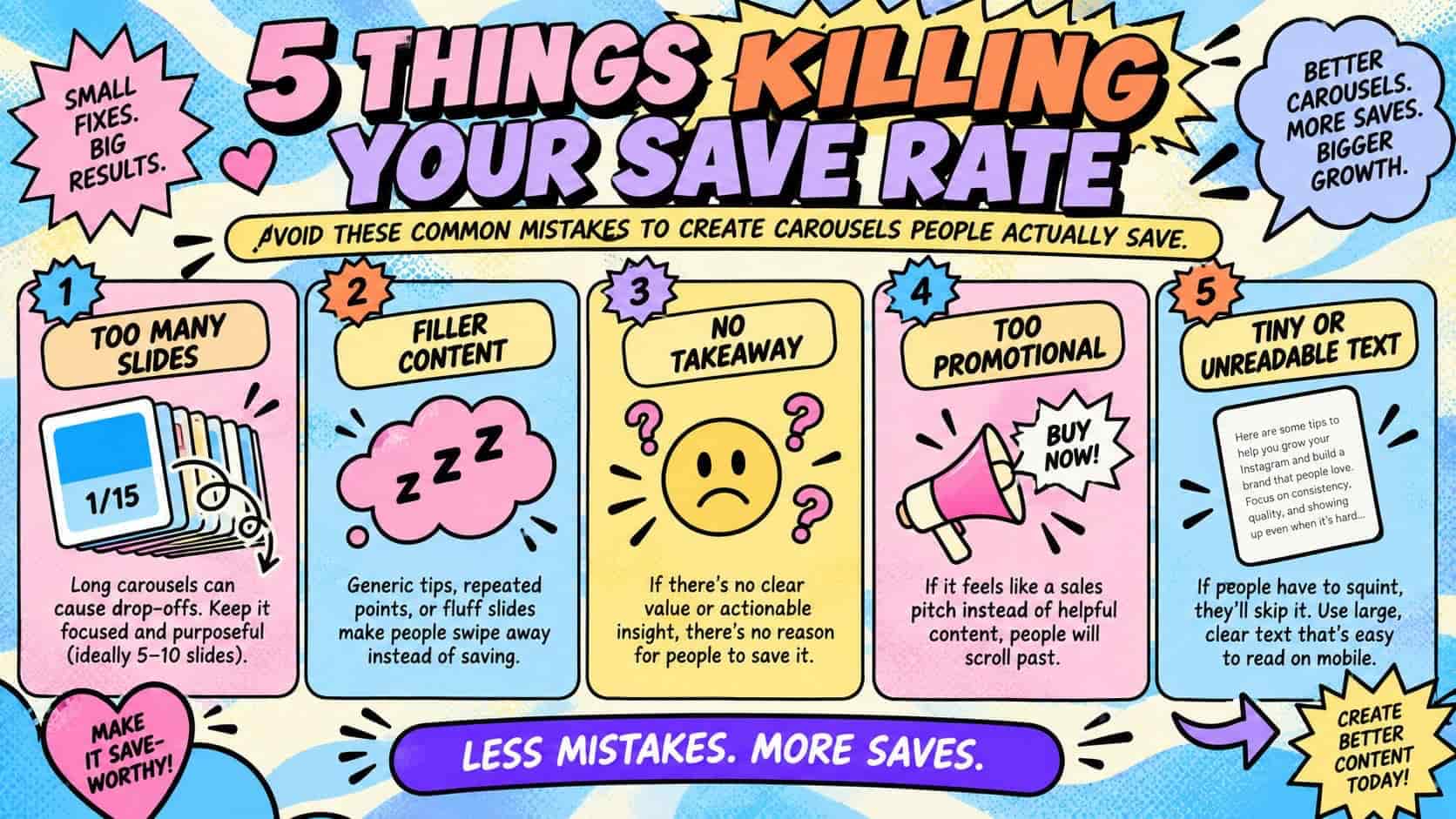
Too many slides. More slides isn't automatically better. If your point can be made in 6 slides, stretching it to 12 to "increase dwell time" usually backfires because people drop off before the end, which actually hurts your completion rate.
Inconsistent value distribution. If slides 2 through 4 are packed with insight and slides 5 through 8 feel like filler, people will notice the drop in quality and disengage.
No clear takeaway. A carousel that ends without summarizing or reinforcing the main point gives people no reason to save it. They finish, feel like they got the gist, and move on.
Overly promotional content. If a carousel feels like an ad disguised as tips, people recognize it quickly and rarely save promotional material for later. Save-worthy content leads with genuine value first.
Ignoring mobile readability. Carousels are consumed almost entirely on phones. Tiny text, cluttered layouts, or low contrast will tank your save rate regardless of how good the information is, simply because people can't comfortably read it.
Measuring Whether Your Carousel Strategy Is Working
Once you start posting carousels consistently, track a few key metrics inside Instagram Insights to see whether your approach is actually improving:
- Save rate (saves divided by reach): this is your core metric and the clearest indicator of whether your content is genuinely useful
- Completion rate: how many people who opened slide one made it to the last slide
- Shares: often correlated with saves, since both signal high-value content
- Profile visits from the post: a strong carousel often drives people to check out your full account, which suggests the content built trust
Look at your top three performing carousels over the last few months and identify what they have in common. Was it the topic? The structure? The opening slide? Patterns will emerge quickly, and those patterns should shape your next batch of content rather than guessing at what might work.
Final Thoughts
Carousels increase saves because they're built for a different kind of engagement than any other Instagram format. They reward structure, clarity, and genuine usefulness, and Instagram's algorithm has learned to treat saves as one of the strongest signals of content quality on the platform. The creators who consistently benefit from this aren't the ones with the fanciest design software, they're the ones who understand what makes someone want to come back to a post later.
Start with a strong first slide, build value through the middle without giving everything away too early, close with a clear takeaway, and don't be afraid to ask for the save directly. Combine that with consistent posting and a willingness to look at what's actually performing, and carousels can become one of the most dependable growth tools in your content strategy.
Keep the momentum going with these handpicked articles. Each one offers valuable insights and actionable takeaways to help you deepen your understanding.